Toplo — UX Case Study
A UX audit and redesign of the reservations screen of Toplo, a fictional web app for managing meeting rooms and coworking spaces.
- Role
- UX/UI Designer (solo)
- Project
- Concept · fictional product
- Timeline
- July 2026
- Platform
- Web · desktop, tablet, mobile
Skills · UX audit · Interaction design · Component design · Responsive design · Figma
16usability issues found in the audit
3step booking drawer, instead of a modal
Part 1
UX audit
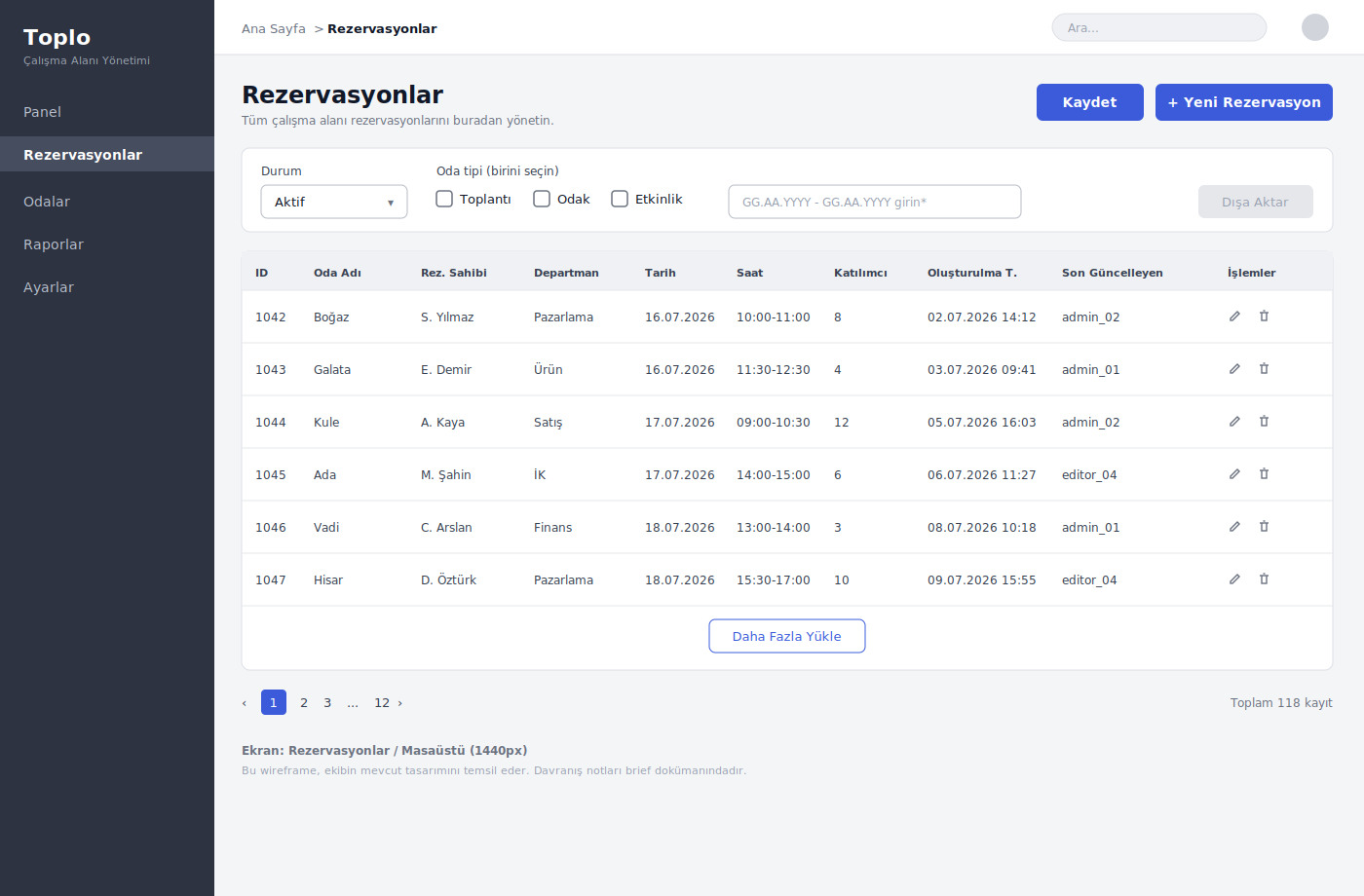
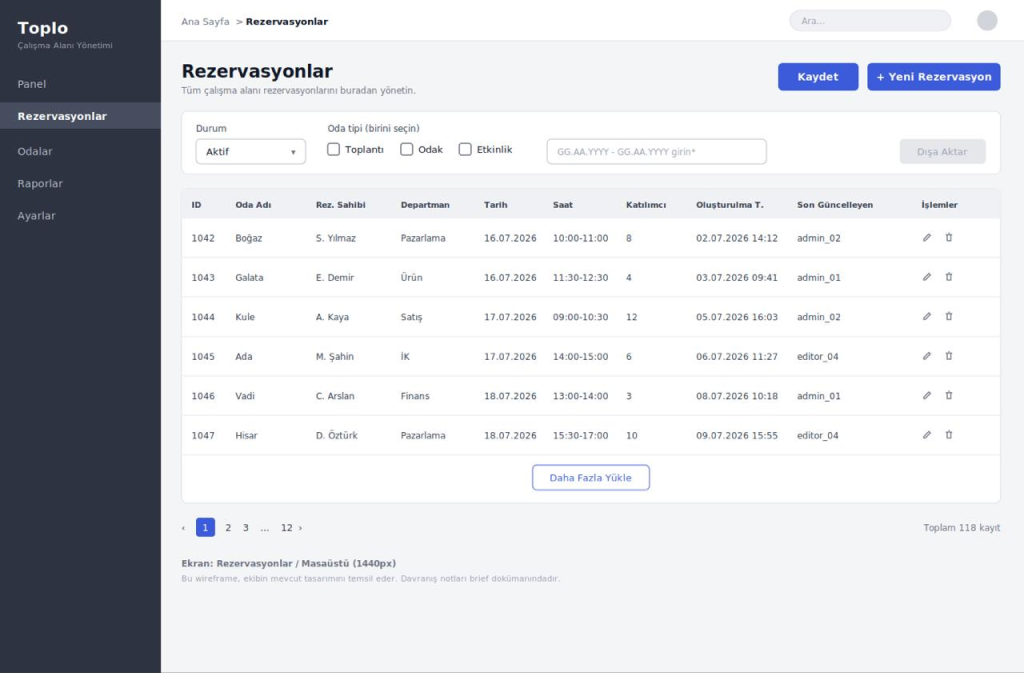
For every issue: what's wrong, why it hurts, and what it should be.
Feedback & errors
- 12Booking conflicts shown in a toast that disappears→ Show free slots up front; busy times can’t be picked
- 13Format errors in a toast, not at the field→ Inline validation under the field
- 14Delete with no confirm or undo→ Confirmation, or soft-delete with “Undo”
- 1Export disabled, reason only on hover→ Always-visible helper text
Controls & signifiers
- 2“Pick one” label on checkboxes→ Segmented control or radio
- 3Required date range typed by hand→ Date range picker
- 4Icon-only actions, no text labels→ Labelled “Edit” and “Delete” buttons
- 5Action icons only 24×24px→ At least 44×44px touch targets
- 6A “Save” button with no clear purpose→ Clarify it, or remove it
Navigation & orientation
- 7Breadcrumb doesn’t match the side menu→ Same labels, clickable
- 8Load-more and pagination on one screen→ Pick one: pagination
- 9“Total 118 records”, but which ones?→ “Showing 1–6 of 118”
Data & layout
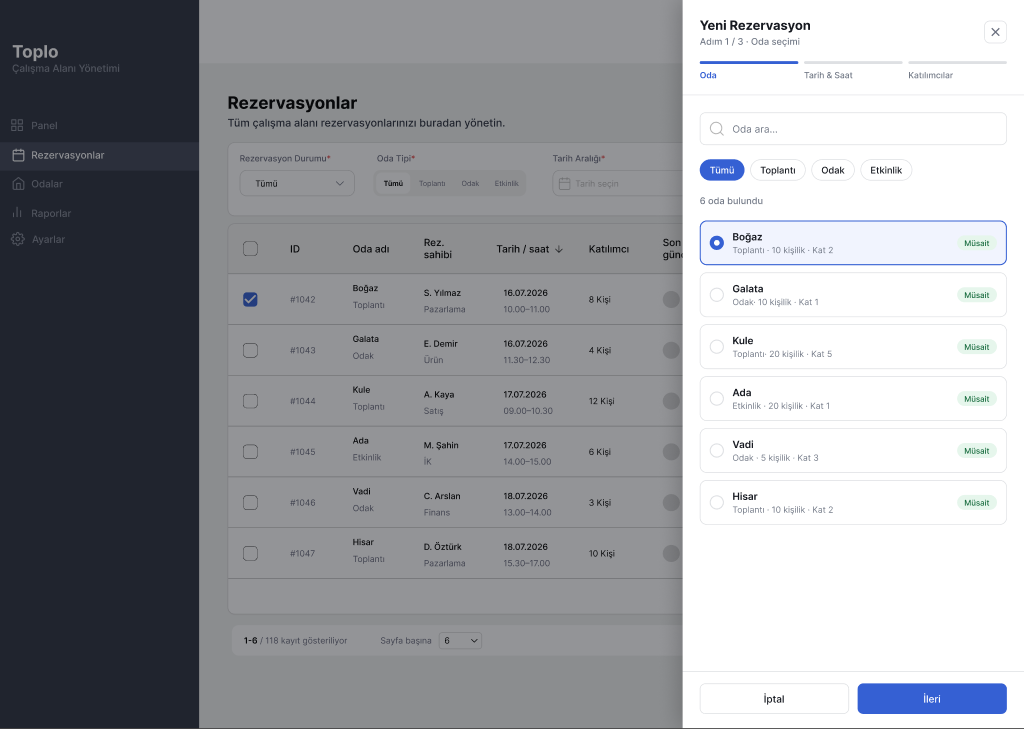
- 15New booking modal hides the table→ Side drawer; the table stays visible
- 10Export needs a selection, but rows can’t be selected→ Row checkboxes + “select all”
- 11No status field: active, cancelled or past?→ A “Status” column with coloured badges
- 16No tablet or mobile design for a 118-row table→ Responsive card layout
Part 2
Redesign
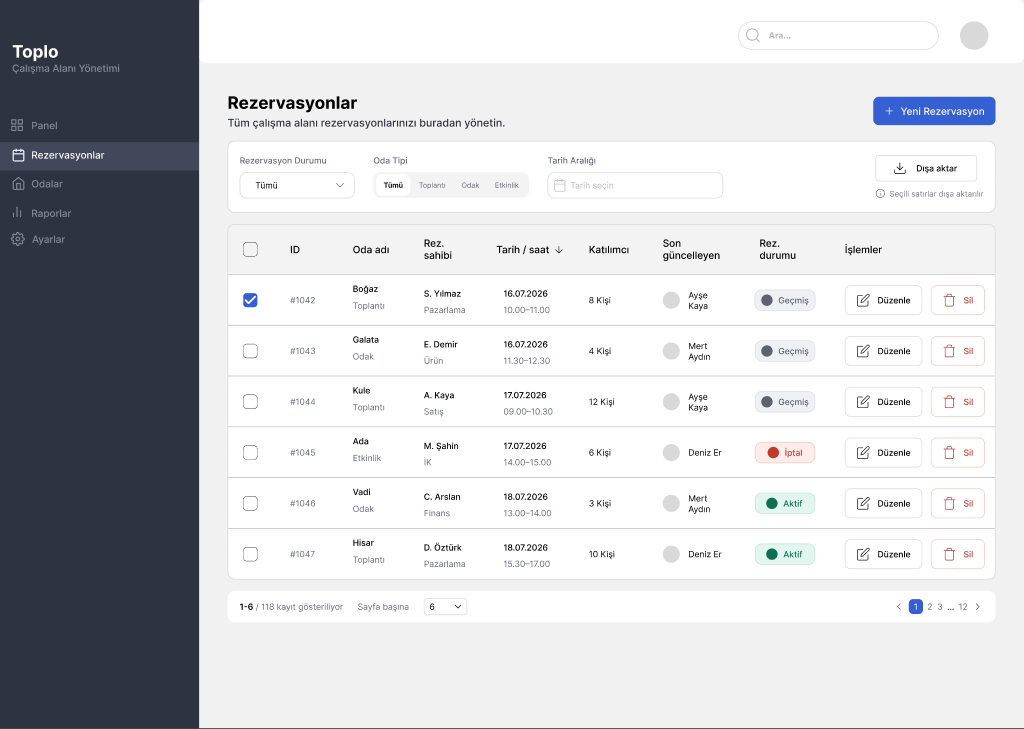
Reservations tableBooking drawerComponent decisions
Component decisions
Every control says what it does
Segmented controlRoom type is one choice out of four, so the control now says so.
Date range pickerNo more typing GG.AA.YYYY: no format errors, no invalid ranges.
Export, always enabledNothing selected = export the filtered list. Rows selected = export those.
Row checkboxesBulk export needs a selection model; the header box selects all.
Labelled actions“Edit” and “Delete” instead of a pencil and a bin: fewer mis-taps.
Status badgesActive, past, cancelled: colour and text together.
Merged columnsRoom + type, date + time, owner + team: 10 columns down to 8.
Names, not IDs“Last updated by” shows an avatar and a name, not admin_02.
Sortable dateThe oldest of 118 records is one click away, not 12 pages.
Pagination only“1–6 of 118” plus rows per page. Load-more stays for mobile.
“Save” removedNothing to save in a list. One primary action: + New reservation.
Delete = modalAn irreversible action deserves a pause; edit opens a drawer.
New reservation
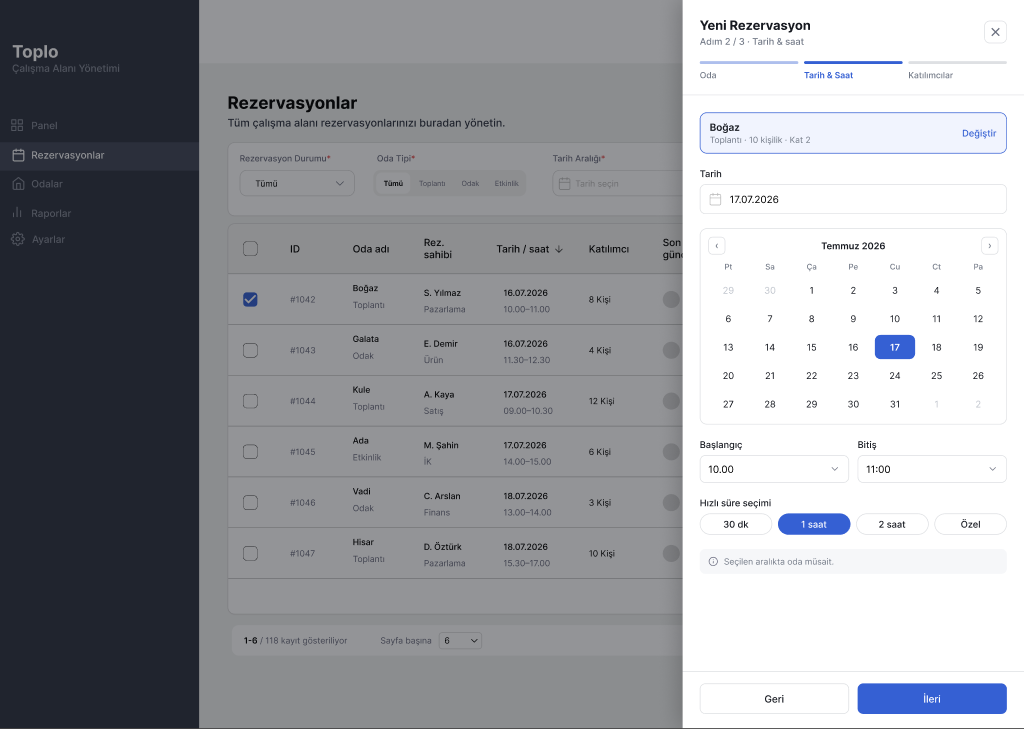
A drawer, not a modal
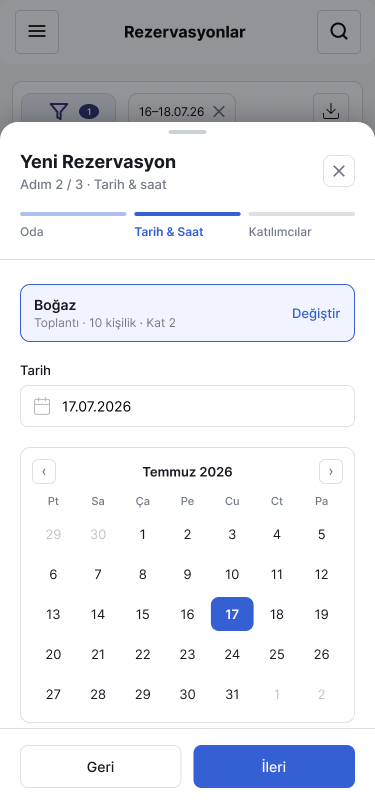
The table stays visible while you book, and the form is long enough to need the height. Three steps: room, date & time, attendees.
Part 3
Responsive logic
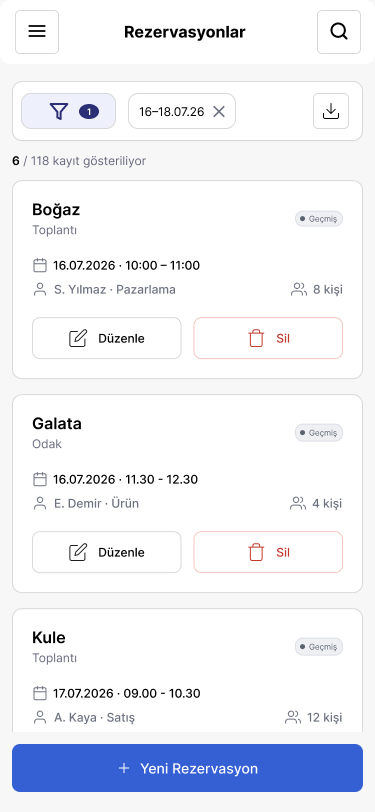
The smaller the screen, the more the table gives way to priority: first columns collapse, then rows become cards.
| Component | Desktop · 1440 | Tablet · 768 | Mobile · 375 |
|---|---|---|---|
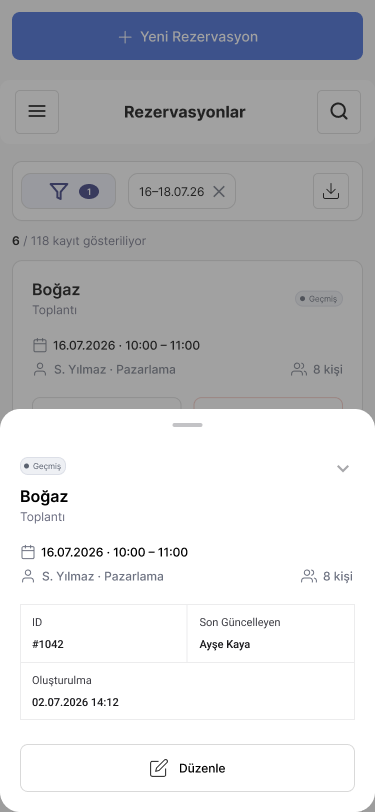
| Table | Full table: merged columns, selectable rows, sortable date | Priority columns; the rest in an expandable row | Cards; details in a bottom sheet |
| Filters | Segmented control, date range picker, export with helper text | Grouped under one Filters button | Grouped under one Filters button |
| Side menu | Icons added next to labels | Narrow, icons only | Hamburger menu |
| New reservation | 3-step side drawer | 3-step side drawer | 3-step bottom sheet |
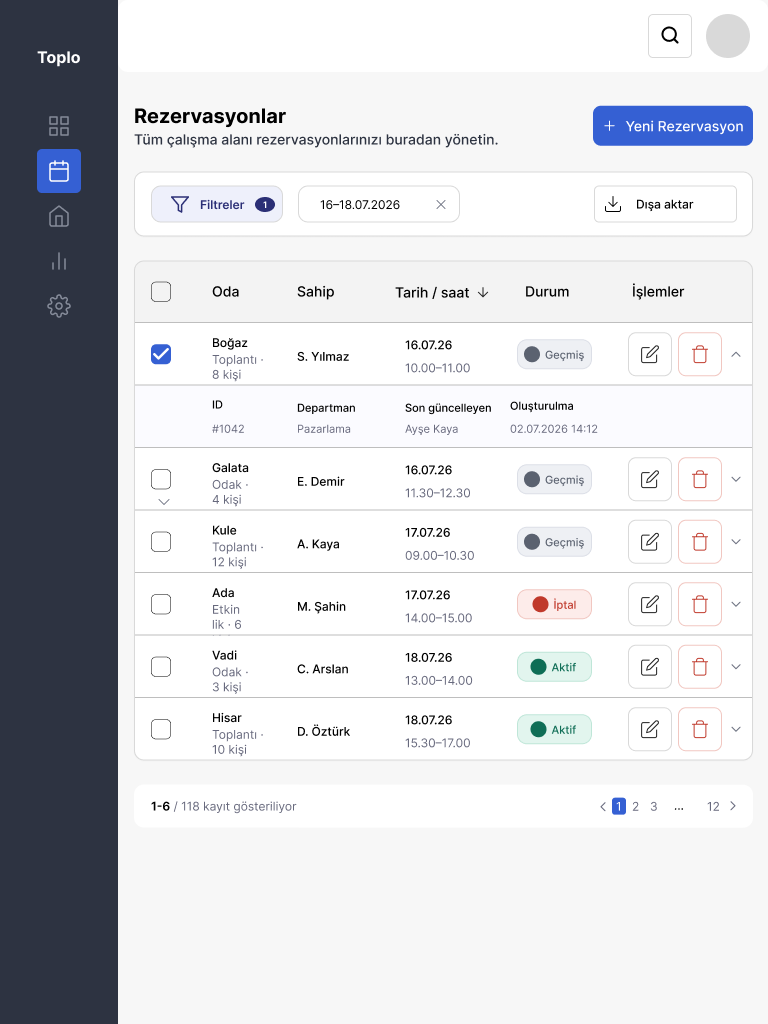
TabletFewer columns, nothing lostID, department, last updated and created date move into an expandable row.
MobileScan down, not acrossEach reservation is a card. Details and booking open in a bottom sheet.